

Modern drivers should not be forced to choose between easy smartphone connectivity and dependable road protection. They should have both (of course).
As you know, Wireless CarPlay is very convenient for drivers, and a reliable dash cam offers peace of mind whenever you go on the road. But there’s a catch.
Installing both as standalone accessories often leads to cluttered dashboards, tangled cords, and you quickly run out of power ports.
That’s where the 2-in-1 wireless CarPlay dash cam comes in.
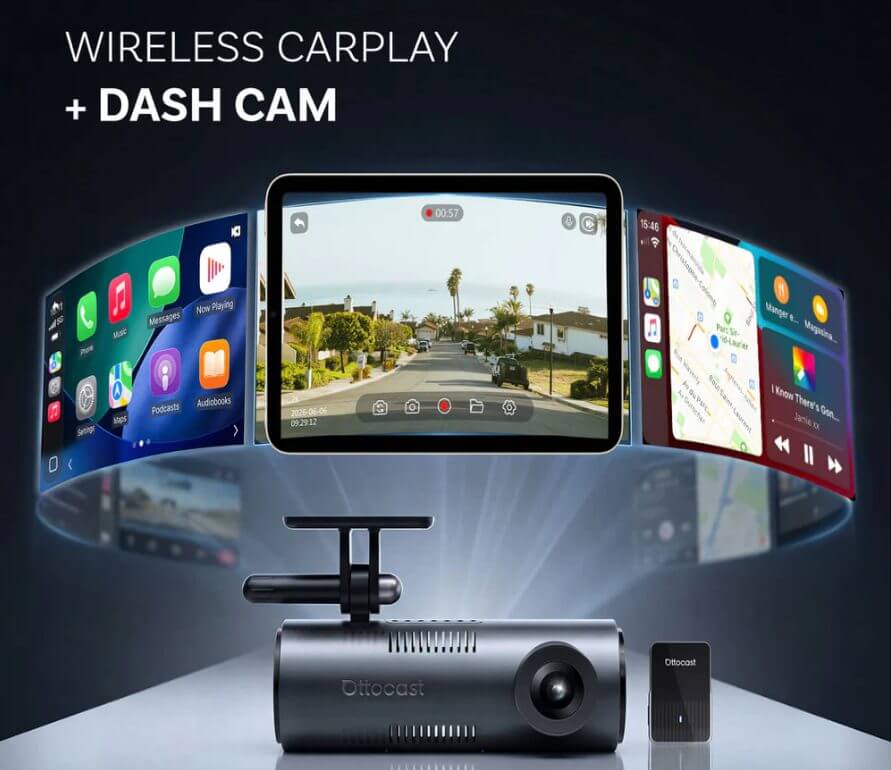
It is a new product category. Basically, it combines a high-definition dash camera and a wireless CarPlay adapter into a single USB device.
Today, we'll introduce you to a leading product in this category. It’s called the Ottosafe Cam.
This is a single-port solution designed to make your daily drive completely seamless. It merges these two essential interior upgrades into one.
Therefore, it gives you full road protection and modern wireless freedom without sacrificing your car’s clean interior aesthetics.
Let’s take a deeper dive and learn more!
The Problem with Separate Setups: Cable Clutter and Port Battles
When you add modern tech to your car, this often comes at the cost of cabin aesthetics.
Just imagine it. You’re running a standalone dash cam alongside a wired CarPlay setup. This creates a frustrating web of dangling power cords, suction mounts, bulky cigarette lighter adapters, and that’s just not pretty.
This dashboard clutter will ruin your modern car interior and obstruct your view when driving.
The main issue, as you can imagine, is port conflicts. In many vehicles, factory-wired CarPlay occupies the primary USB data port. If you want to add a separate dash cam to the mix, you are usually faced with inconvenient compromises:
- Occupied Ports: You need to sacrifice secondary USB ports or 12V power sockets just to keep the camera powered;
- Messy Cable Runs: You need long (and very visible) cords across the center console and windshield;
- Permanent Hardwiring: The installation is complex, and you need to wire the camera directly into the fuse box just to hide the cables.
And, as you can imagine, worrying about multiple separate devices, power sources, and smartphone apps adds a hefty dose of hassle to every trip. Stacking standalone accessories creates a fragmented setup that distracts from an otherwise clean driving environment.
How 2-in-1 Architecture Works: Single-Port Simplicity

The simplest explanation goes something like this.
You don’t have to rely on two separate dongles. The Ottosafe Cam has a single-port architecture that handles power delivery, high-definition video processing, and wireless data routing.
You just plug the unit into your car’s primary CarPlay USB port, and it creates an efficient internal workflow:
-
Unified Power and Data Stream
One USB port powers the internal dash cam and manages high-speed wireless CarPlay data transmission to your car’s head unit. -
True Plug-and-Play Setup
Unlike traditional dash cams that often require hidden wires through door seals or hardwiring directly into the fuse box, the Ottosafe Cam 2-in-1 unit works right out of the box with simple plug-and-play installation. -
Preserving Factory Aesthetics
You won’t occupy any extra 12V sockets or add bulky USB hubs. Your center console will be free for phone charging or whatever else you need it for.
This simplicity offers road security and modern infotainment in one neat package, giving drivers full functionality without compromising cabin space.
The Key Features of the Ottocast Ottosafe Cam

The Ottocast Ottosafe Cam packs a punch with advanced hardware and a remarkably compact frame.
2K QHD Video Capture and Wide Field of View
The Ottosafe Cam records in 2K QHD resolution.
Pair that with low-light optimization, and you can capture crucial road details (such as lane markers, street signs, and surrounding traffic) no matter the time of day.
The adjustable lens allows you to fine-tune the camera angle on your windshield to maximize coverage and (importantly) minimize blind spots.
Low-Latency 5GHz Wireless Connection
It comes with dual-band Wi-Fi (5GHz) and Bluetooth. You get rapid automatic pairing, and once your car starts, your iPhone connects seamlessly.
You get low-latency wireless CarPlay for real-time GPS navigation, hands-free calls, and uninterrupted music streaming.
Emergency G-Sensor and Double-Tap Snapshot Capture
Road safety requires maximum responsiveness. The Ottosafe Cam protects your video files using two distinct methods.
The first one is G-sensor impact locking.
If the car brakes hard or if there’s a sudden collision, the built-in G-Sensor automatically locks the current recording. That way, it prevents loop recording from overwriting critical footage.
The second method is the double-tap snapshot feature.
This double-tap feature lets you capture a high-resolution snapshot of memorable scenery or unexpected road incidents on the fly.
Managing Dash Cam Footage Directly on Your Car Display

Traditional dash cams often force drivers into annoying compromises. Viewing recordings usually means squinting at a tiny built-in screen or dealing with slow, unreliable Wi-Fi file transfers to a smartphone app.
This 2-in-1 device solves this by bringing video management directly to your car’s main head unit.
You get an in-dash live preview. You can check live camera feeds on your factory infotainment display and instantly confirm lens alignment.
There’s also direct video replay and file management. You can review, lock, or clear saved clips right on your central dashboard screen (you don’t have to download apps or disconnect your phone).
Finally, you get seamless interface switching. You can switch between CarPlay navigation and road view controls. This keeps GPS guidance and music playback active without any interruptions.
Comparison: 2-in-1 Device vs. Separate Setups
| Feature | 2-in-1 Wireless CarPlay Dash Cam | Separate Devices (Cam + Adapter) |
|---|---|---|
| Number of Devices | 1 compact unit | 2+ individual devices |
| USB & Port Usage | Uses 1 primary CarPlay USB port | Occupies multiple ports / 12V outlets |
| Cabin Aesthetics | Cable-free, clean dashboard | Multiple dangling wires & mounts |
| Installation Difficulty | Instant plug-and-play | Requires routing wires or hardwiring |
| Footage Management | Managed directly on factory screen | Small camera screen or phone app |
| Reversibility & Leases | 100% plug-and-play (ideal for leases) | May require removing custom wiring |
What You Need to Know in Terms of Compatibility
There are a few things that you need to check.
The Primary Requirement is Factory Wired CarPlay
A 2-in-1 device like the Ottocast Ottosafe Cam needs factory-installed wired CarPlay. The device relies on your car’s original wired CarPlay USB data port to communicate with the central head unit.
Who Should Double-Check Compatibility?
Before you add a 2-in-1 setup to your car, check your car’s specs and see if you fall into any of these categories.
- Vehicles that only feature native wireless CarPlay without support for a wired USB connection will not recognize the data interface.
- Non-factory head units (such as specific aftermarket Android radio systems) will probably require separate compatibility confirmations.
- Some cars have multiple USB ports, but only one of them is configured for primary CarPlay data transfer (often marked with a smartphone or plug icon). You should know where this USB port is before you get your hands on the Ottosafe Cam.
A Quick 3-Step Setup Guide

You can install the Ottocast Ottosafe Cam in just a few minutes. You need zero technical experience or custom tools. Here is how to complete the setup.
- Connect the Ottosafe Cam directly into your car’s primary wired CarPlay USB data port using the provided cable.
- Place the compact camera module in a suitable spot on your windshield or dashboard, then adjust the lens angle using the live display on your central screen to ensure full road coverage.
- On your iPhone, open Bluetooth settings and pair with the device. Once initial pairing is complete, it will connect automatically for every future drive.
Who Is a 2-in-1 Setup Best For? (And Alternatives)
This product isn’t just a gadget. It’s an excellent solution for specific (and common) driver needs.
Who are the Ideal Candidates?
- Clean-cabin enthusiasts and drivers who value a clutter-free car interior without dangling power cords or blocked power outlets;
- Leased car drivers who want high-definition road recording and wireless CarPlay without making permanent modifications;
- Daily commuters who want an upgrade from wired CarPlay and added driving security without managing separate apps and devices.
When to Consider Alternatives?
Drivers who want more advanced in-car entertainment and app functionality may prefer a CarPlay AI Box, while those focused on wireless connectivity and road recording may find a 2-in-1 dash cam solution more practical.
- Drivers who specifically require front, rear-window, and interior cabin recording simultaneously should look for alternative solutions.
- Users who need complex, hardwired parking monitoring that draws power directly from the car’s battery while parked for extended periods should find a different device.
FAQs
Does the camera record while CarPlay navigation is displayed?
Yes. The dash cam records video footage in the background directly to the internal storage card (even while you are actively using maps or audio streaming apps on your car’s display).
Do I need a MicroSD card for video storage?
Yes, you do. 2K QHD video files are stored locally on a MicroSD card that you need to insert into the device. This ensures continuous loop recording without relying on your smartphone memory.
Is this device suitable for leased or rental vehicles?
Yes, absolutely. It’s 100% plug-and-play. You can unplug and transfer the unit between cars in seconds without leaving any permanent trace or wiring behind.
Conclusion
Upgrading your car’s tech shouldn’t mean sacrificing cabin aesthetics or fighting over limited USB ports.
The Ottocast Ottosafe Cam sets the standard for single-port integration. You get responsive wireless navigation, 2K video protection, and simple in-dash footage management. No messy wires or hardwiring hassles.
Transform your daily drive and visit the Ottocast Ottosafe Cam product page today to upgrade your cabin.
Featured Products